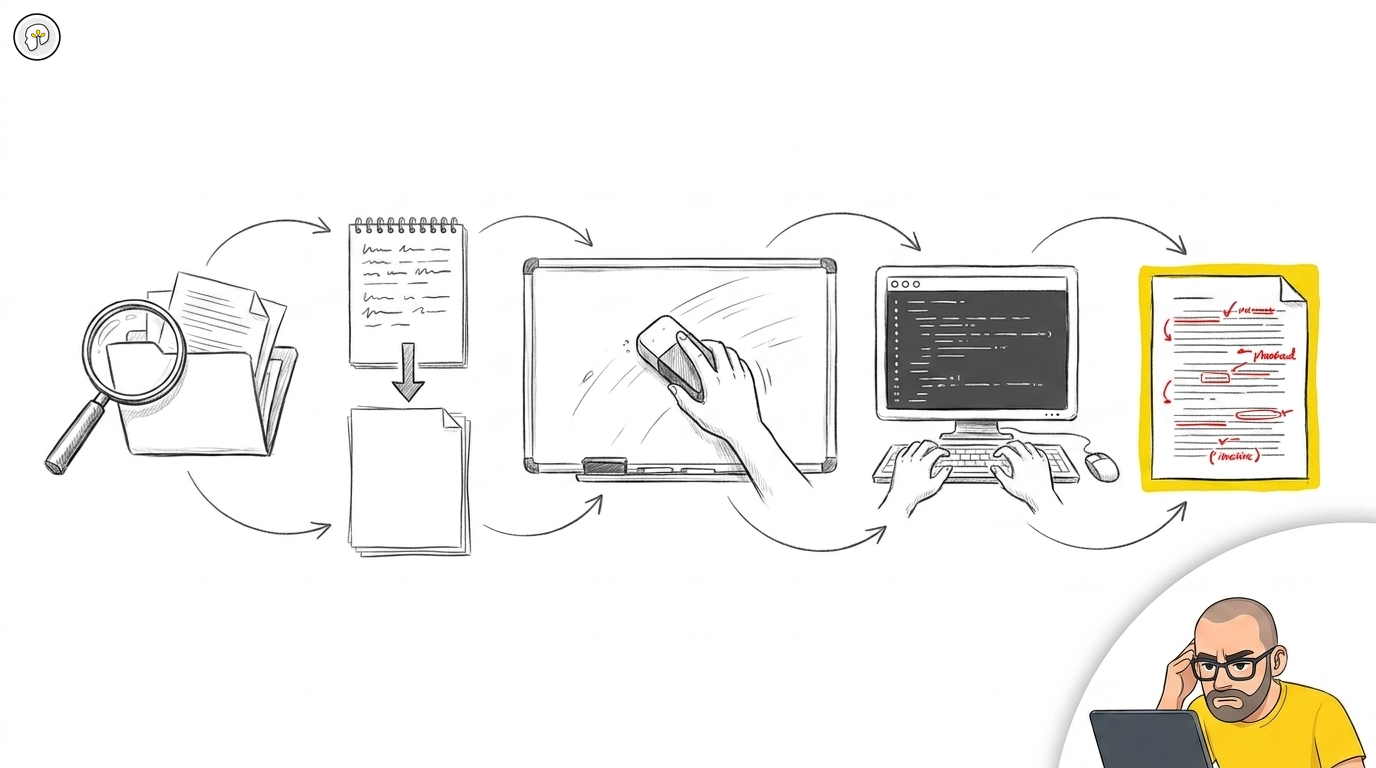
The AI development workflow: read, plan, flush, build, review
Most developers using AI tools in 2026 have no process. They open a session, type a prompt, get output, iterate until it looks right, and commit. Sometimes it works. Often it doesn't. When it doesn't, they blame the tool.
The tool is rarely the problem. The process is.
After working with development teams across multiple organizations — watching what works and what fails in production, not in demos — one workflow pattern has emerged as consistently effective. It is not complicated. It has five steps. Most teams skip at least two of them.
The loop
Read project → Plan to disk → Flush context → Build from plan → Review every line
Each step exists for a specific reason. Skipping any one of them degrades the result. Here is what each step does and why it matters.
Step 1: Read the project
Every session starts the same way. Before generating a single line of code, the LLM reads the project.
Not "reads the file you're working on." Reads the project. The architecture. The recent git history. The guidelines and conventions. The existing patterns. The domain terminology.
A model that understands your system produces code that belongs in your system. A model that doesn't will produce syntactically correct code that violates your architecture, uses wrong naming conventions, and introduces patterns that conflict with everything around it. That code compiles. It passes basic tests. And it creates technical debt the moment it merges.
The investment is five minutes. The return is hours of avoided wrong-direction work.
If your project has rule files — CLAUDE.md, AGENTS.md, .kilocode/rules/, .cursorrules — this step is where they earn their value. The model reads them and constrains itself before producing anything. Without rule files, Step 1 is best-effort guessing. With them, it is informed generation.
Step 2: Plan to disk
Before implementation, ask the model to produce a plan. Not in the conversation — on disk.
A change request document. A design proposal. A specification. Whatever format fits your project. The point is that the plan becomes a file, committed or at least saved, that exists independently of the conversation.
Why on disk? Because the plan needs to survive the next step.
This maps to what experienced developers have always done: think before coding. The difference with AI tools is that the thinking can be externalized — written as a document that both you and the model can reference. A plan in the conversation is volatile. A plan on disk is durable.
Review the plan before proceeding. This is the cheapest place to catch a wrong direction. Changing a plan costs minutes. Changing an implementation costs hours.
Step 3: Flush the context
This is the step nobody does. It is the one that changes everything.
After the plan is written to disk, clear the conversation. Start a new session. Or, if the tool supports it, explicitly reset the context window.
Why? Because the context window during planning is filled with exploration, questions, alternatives, dead ends, and decision-making artifacts. That context is valuable for planning. It is noise for implementation.
When you start the implementation phase with a clean context and load only the plan document plus the relevant code, the model works from a clear specification — not from a muddled conversation history that includes every wrong turn from the planning phase.
The plan document is the bridge between the two phases. It carries the decisions forward. The conversation noise stays behind.
This is not a theoretical optimization. Teams that flush context between planning and implementation report fewer off-target implementations, less "the model went in a different direction than we discussed," and shorter review cycles. The plan on disk is unambiguous. The conversation in memory is not.
Step 4: Build from the plan
Load the plan. Load the relevant code. Implement.
This phase is where most tutorials start — and why most tutorials produce mediocre results. Implementation without Steps 1-3 is generating code in a vacuum. Implementation after Steps 1-3 is building within understood constraints from a reviewed specification.
The model should follow the approved plan. If something unexpected surfaces during implementation — a dependency that wasn't considered, an edge case that the plan missed — stop. Don't improvise. Update the plan first, then continue. The plan is the contract between you and the tool. Deviating from it without recording the deviation is how "the model did something weird" happens.
Step 5: Review every line
Read every diff. Every file. Every change.
This is not a suggestion. This is where professional responsibility manifests. The moment you read a diff and decide "this is correct" is the moment accountability happens. Automate that away — auto-commits, auto-changelogs, automated test loops that approve without human review — and you automate away the only thing that makes your name on the code mean something.
Update the changelog manually. Not because it takes long. Because the two minutes it takes to write what changed forces you to understand what changed. An auto-generated changelog is a summary of something nobody reviewed. It looks professional. It is meaningless.
Run whatever verification makes sense: tests, type checks, linting. But verification is not review. Verification confirms that code runs. Review confirms that code should exist.
Why this order matters
The five steps are not interchangeable. They form a dependency chain:
Read enables informed planning (without it, the plan ignores the existing system). Plan externalizes decisions (without it, decisions live only in conversation memory). Flush separates planning noise from implementation clarity (without it, the model hallucinates from stale context). Build executes within constraints (without the prior steps, it executes in a vacuum). Review closes the accountability loop (without it, the output is unowned).
Skip Read and you get code that doesn't fit the system. Skip Plan and you get code that solves the wrong problem. Skip Flush and you get code that drifts from the plan. Skip Build-from-plan and you get improvised code. Skip Review and you get unowned code.
Most teams skip Flush and Review. Those are the two steps that matter most.
The voice input advantage
One practical enhancement that compounds the workflow: use voice input for planning.
When you speak a prompt instead of typing it, you express more context. Associations, nuances, conditions, edge cases — they flow naturally in speech but get compressed away in typing. A spoken description of what needs to change carries information density that a typed prompt rarely matches.
This applies specifically to Steps 1 and 2 — the exploration and planning phases where breadth of context matters. For Step 4 (implementation), typed prompts with precise instructions are more effective. Match the input mode to the phase.
What this workflow produces
Teams that follow this loop consistently report:
- Fewer "the model went in the wrong direction" incidents (the plan catches direction errors before implementation)
- Shorter code review cycles (the implementation matches the specification because both are explicit)
- Less technical debt from AI-generated code (the model works within loaded guidelines, not from generic patterns)
- Higher confidence in AI-assisted output (every line is reviewed, every change is understood)
None of these outcomes require a better model, a more expensive subscription, or a new tool. They require a process. Five steps. The same five steps, every time.
The tool is capable. The question is whether you use it within a process that produces accountable output — or without one, hoping for the best.
This workflow is the practical implementation of principles covered in Three ways to work with AI output and Why developer accountability can't be automated. For the organizational layer — repo rules that constrain AI before it generates — see From individual AI to organizational AI.